
How to Build Your First Website: Step-by-Step Guide for Beginners
The idea of building a website can be intimidating at first, but given the right tools, planning, and guidance, anyone can do it. Whether a personal blog, portfolio, or business site, understanding how to build your first website lays the foundation for long-term success. In this step-by-step guide, you'll learn how to create your own website, customize its design, and bring your vision online – even if you're a complete beginner.
Table Of Content
Understand Why You Need a Website
Choosing the Right Platform For Your Website
Register a Domain Name
Get Dependable Web Hosting
Install a Website Platform or CMS
Choose and Customize Your Website Theme
Create the essential website pages
Add Content That Engages Visitors
Website Optimization for SEO
Make Your Website Mobile-Friendly
Add Functionality with Plugins and Tools
Fully Test Your Website
Launch Your Website
Update and Maintain Regularly
Track Performance with Analytics
Final Thoughts
Frequently Asked Questions
Understand Why You Need a Website
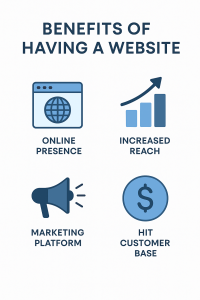
In designing a website, the first thing to do is to clearly state what your aims are. Is it to sell products, services, or information? Depending on one’s purpose, there can be planning of content and an effective structure.

*ImagiNet Ventures
Choosing the Right Platform For Your Website
- Website Builders: Wix, Squarespace, and WordPress.com offer user-friendly web development tools, excellent for starters.
- Content Management Systems (CMS): Website owners have more control, flexibility, and room for growth with platforms like WordPress.org.
If you want to build a website from scratch without coding, website builders are ideal. However, if you are willing to learn and need full ownership of your website, using a CMS such as WordPress.org is extremely powerful.
Register a Domain Name
When learning how to build a website from scratch, remember that your domain plays a big role in SEO and branding. Your domain should be short, relevant, and easy to spell. Many web hosts couple domain registration with hosting plans, making the process seamless.
Once you’ve registered it, you can move on to hosting: the digital home where your website files will live.
Get Dependable Web Hosting
Shared Hosting: Costs $10-$30/month. Though it has a few drawbacks, it’s usually pretty good for small websites and is generally very affordable and easy to use.
- VPS Hosting: Offers more power and flexibility for growing sites.
- Dedicated Hosting: Best for large-scale websites with heavy traffic.
- Cloud Hosting: Scalable and efficient for modern businesses.
Select a hosting service with good uptime, at a decent speed, and featuring responsive customer support, like Bluehost, Hostinger, or SiteGround.
Your hosting setup is the crucial step when you build a website from scratch, ensuring it runs effectively and safely.
Install a Website Platform or CMS
Once WordPress is installed, you will have access to the dashboard, your site’s control center. Here, you have the opportunity to begin designing a website by choosing themes, plugins, and page layouts.
This stage marks a significant turn in learning how to create a website from scratch: from setting it up to customizing.
Choose and Customize Your Website Theme
Design your website with a theme that reflects your niche, such as: minimalist themes for portfolios, modern layouts for startups, or creative templates for artists.
Once you install your theme, customize it by updating the logo, fonts, and colors. You can use the built-in editor or drag-and-drop builders such as Elementor or Divi. This hands-on phase makes the learning process of creating your own website both exciting and personal — it’s where a vision starts to take shape.
Create the essential website pages
- Home Page: The main landing page that introduces the visitors to your brand.
- About Page: Explains who you are and what you do.
- Services or Products Page: Outlines what you offer.
- Blog Page: Shares insights, updates, or tutorials.
- Contact Page: Allow visitors to get in touch with you easily.
When building a website, pay attention to simple navigation and clear calls to action, such as “Contact Us” or “Get Started”. Keep the layout intuitive: users should be able to find what they need in a few clicks.
Add Content That Engages Visitors
Use compelling headlines, high-quality visuals, and keep paragraphs short. When you design a website, think in terms of user experience: avoid clutter and make content easy to read.
Great content also helps with ranking in the search engines, which means more organic traffic flows to your site.
Website Optimization for SEO
The key SEO steps would involve the following:
- Using the key phrase technique in titles and text.
- Adding meta descriptions for each page:
- Optimizing images with alt text:
- Create internal linking between pages.
- Make your site load fast and be mobile-friendly.
And further, plugins like Yoast SEO or Rank Math help you do that within WordPress. A well-optimized site will attract more visitors, making your efforts to design a website truly worthwhile.
Make Your Website Mobile-Friendly
Use responsive themes that automatically adjust the layout for screen size. Test your website using Google’s Mobile-Friendly Test tool. Having a responsive design not only improves the user experience but also boosts SEO rankings.
When designing for mobile, consider simplicity in navigation, highly readable fonts, and images that load quickly.
Add Functionality with Plugins and Tools
- Contact Form 7: Adds contact forms easily.
- WooCommerce: Turns your site into an online store.
- Elementor: This lets you design a website visually.
- WP Super Cache: This plugin will help to speed up the site loading.
- UpdraftPlus: Automatic backup of your site.
While learning how to build a website from scratch, be selective with plugins. Too many can slow down your site, so install only what you truly need.
Fully Test Your Website
This stage in how to make your own website ensures a smooth user experience. Test your navigation, buttons, and forms to ensure that everything works right.
When you design a website with attention to detail, you build credibility and trust among your visitors.
Launch Your Website
Launching successfully marks the accomplishment of learning how to build a website from scratch, but remember: building is merely the beginning; maintaining and updating your site regularly keeps it fresh and relevant.
Update and Maintain Regularly
- Update content frequently.
- Back up your data regularly.
- Keep plugins, themes, and WordPress current.
- Monitor the site’s speed and security
Regular maintenance ensures your visitors always have a smooth, secure experience. When you design a website, think long-term — treat it as a growing asset, not a one-time project.
Track Performance with Analytics
Knowing your visitors’ behaviors helps in improving your website. Tools such as Google Analytics and Search Console will show insights about the traffic sources, page performance, and user engagement.
Analytics is, essentially, your feedback loop when learning how to build a website from scratch. It will show you what works and what needs improvement.
Use this data to continuously adjust and refine your design, content, and SEO strategy.
Final Thoughts
Learning how to make your own website is among the most empowering digital skills in today’s world. Be it for a student, entrepreneur, or creative professional, having a personal or business site enhances one’s visibility and credibility.
When you design a website, you’re actually building much more than just web pages: an online experience that represents your brand. And once you can make a website from scratch, there’s no limit to how you can adapt, expand, and innovate. Start small, stay consistent, and keep experimenting. Your first website is merely the first step in your digital journey.
Frequently Asked Questions
Yes, you can easily learn how to create your own website on beginner-friendly platforms such as WordPress or Wix. These tools will help you with designing a website without coding and guide you through how to build a website from scratch.
Absolutely! Even without prior technical knowledge, one can learn in a few simple steps how to create a website from scratch. In addition, many platforms allow beginners to create and design websites using drag-and-drop tools.
Yes, you can learn the basics of HTML in a week to know how to create a website from scratch. Knowing HTML helps you design a website more precisely and gives you full control when you create your own website.


